BlueOptima
Turning a support-heavy integration process into a scalable self-service system
BlueOptima
SaaS B2B
Involvement
Lead UX/UI Designer
Year
2025/2026
BlueOptima provides insights into software development performance. To generate these insights, the platform needs access to engineering data from Version Control Systems (VCS).
Connecting these data sources was a critical step both for onboarding new customers and for enabling existing customers to maintain their data.
However, integrations had evolved over time without a unified experience, creating friction for both users and internal teams.
Instead of being a quick setup task, onboarding data sources had become a complex operational process.
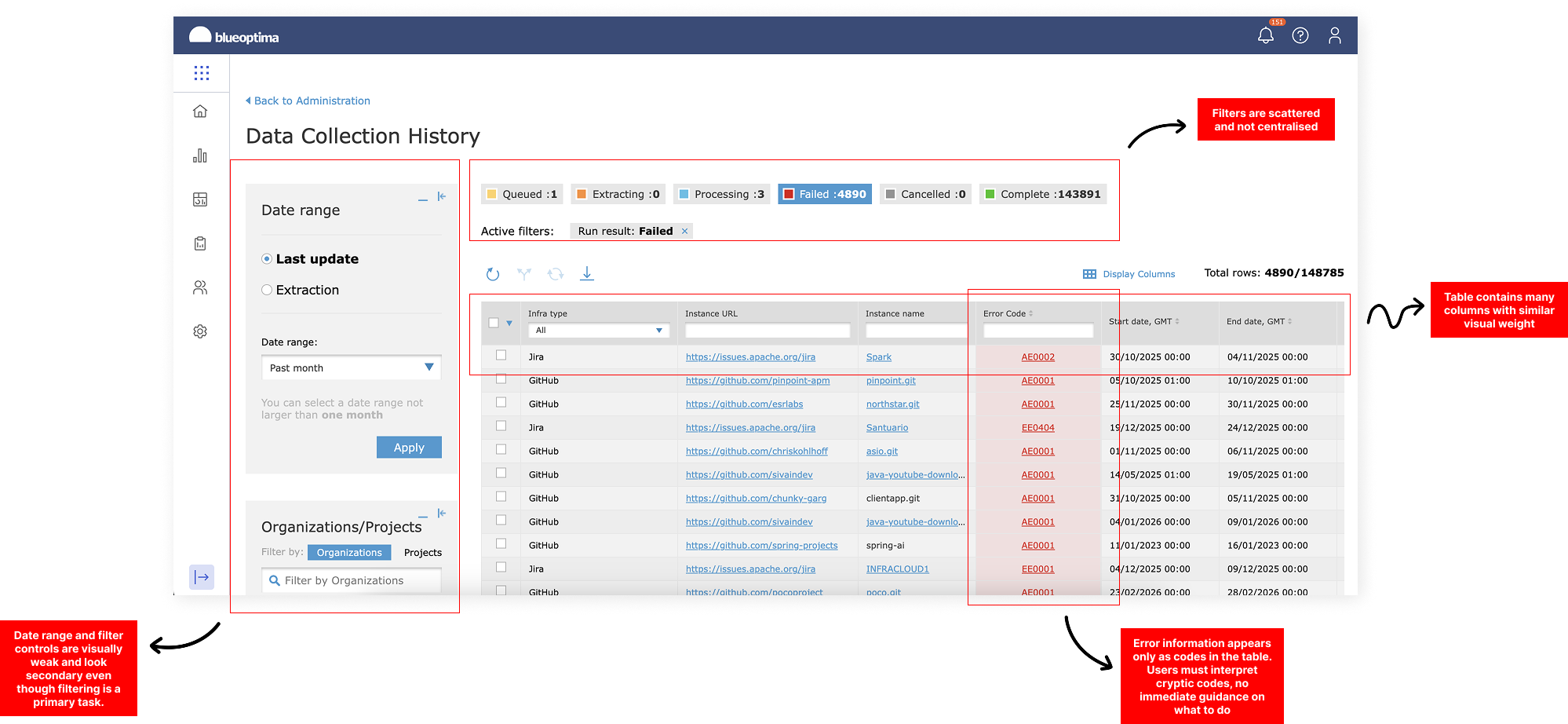
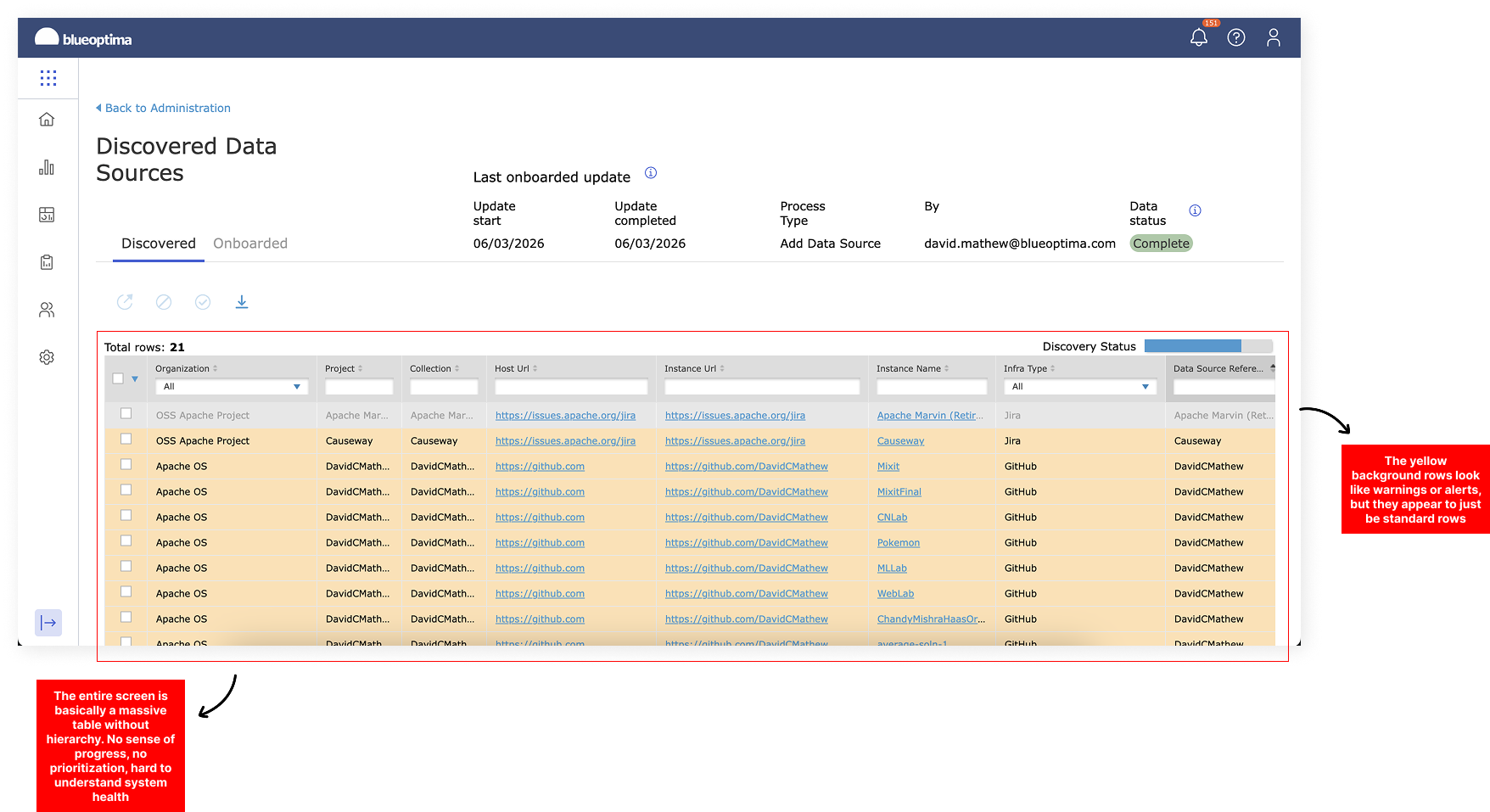
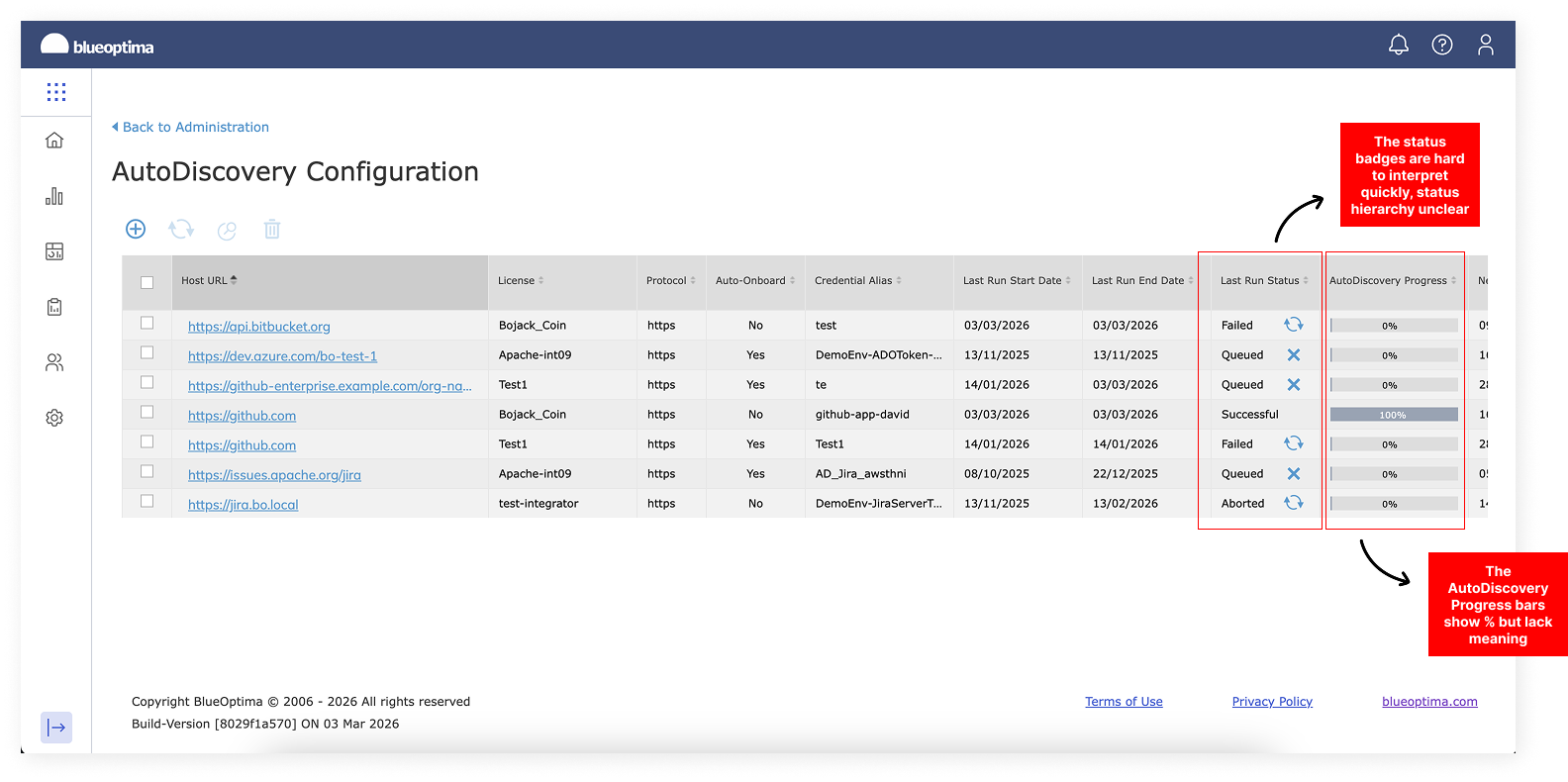
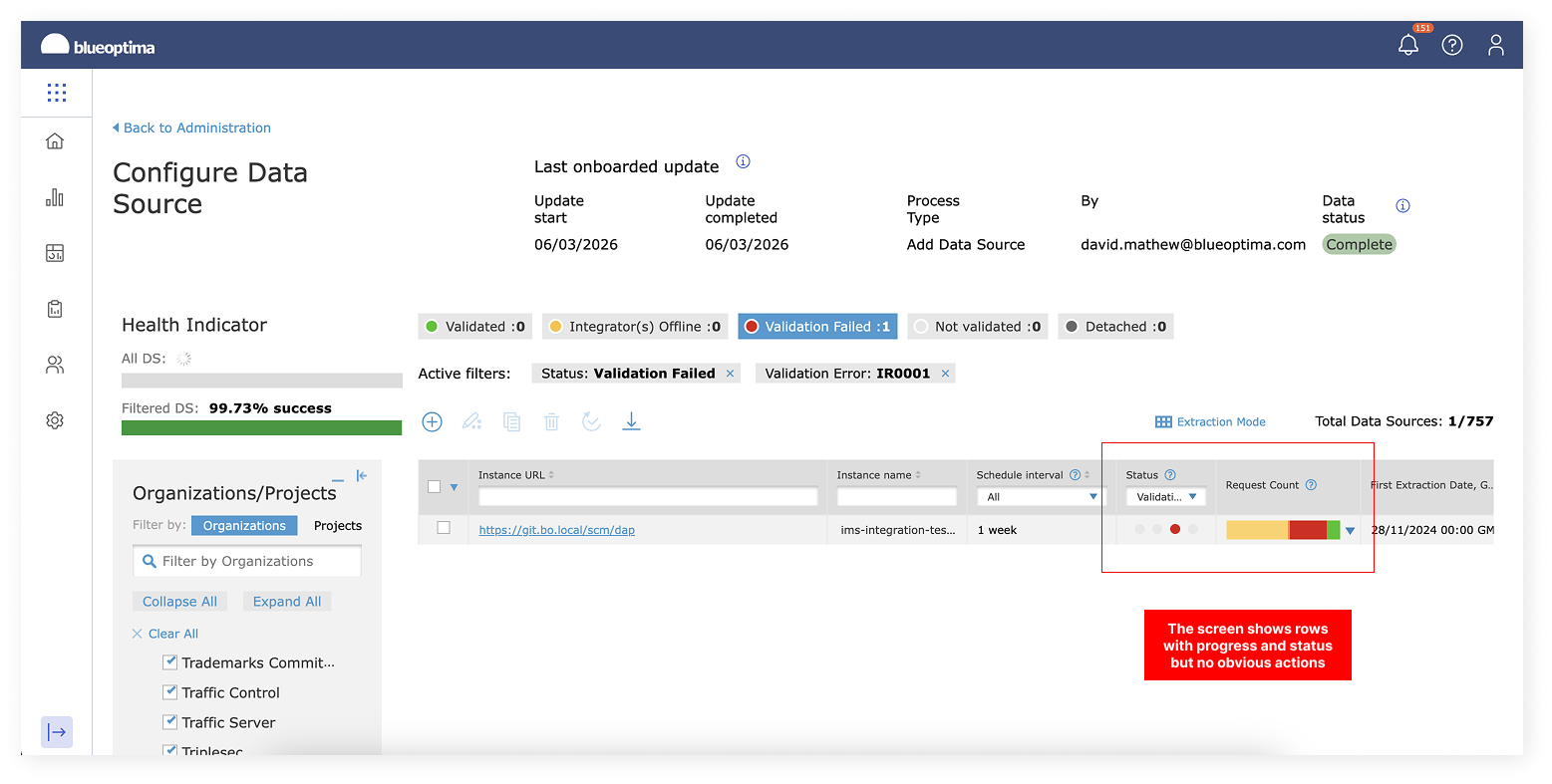
Scattered flow prior to redesign
CORE PROBLEM
Enterprise administrators were responsible for onboarding their organisation’s data sources.
But the existing experience made it difficult to:
configure integrations independently
monitor data extraction
resolve errors when connections failed
manage repositories or projects
As a result, onboarding relied heavily on:
Technical Support
Implementation Managers
Customer Success teams
This slowed down onboarding and created operational overhead internally.
LEARNINGS FROM INTERNAL TEAMS
Customer Success Manager
“Customers can usually connect their repository, but when the data doesn’t appear they immediately reach out to us. They don’t know whether the integration failed, if permissions are wrong, or if the data is still processing.”
Implementation Manager
“Most of our onboarding time isn’t spent connecting the integration, it’s spent troubleshooting it. Admins don’t have the information they need to fix issues themselves.”
Customer Success
“Once the integration is set up, customers still ask us if everything is working correctly. They struggle understanding the health of the connection or how to solve issues.”
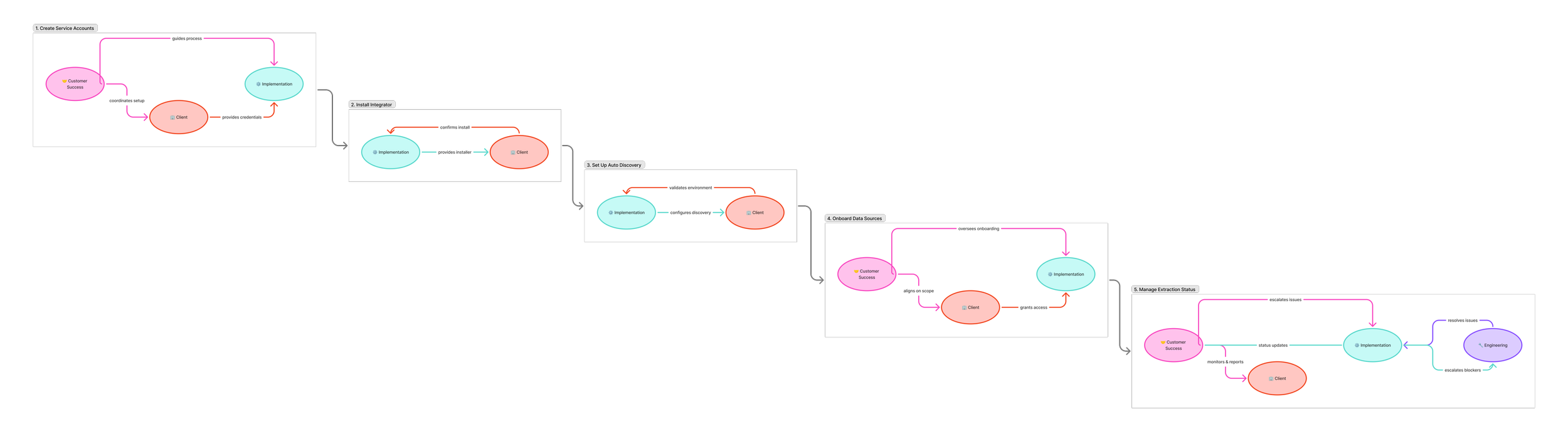
Integration setup required multiple internal teams to resolve configuration and extraction issues.
PRODUCT GOAL
The project aimed to transform integrations from a support-driven setup process into a self-service capability for enterprise admins.
I defined three success criteria:
Admin self-sufficiency
Admins should onboard and manage data sources independently.Reduced friction
Connecting a data source should require fewer steps and clearer guidance.Data health visibility
Users should immediately understand whether integrations are working correctly.
MY ROLE
As Lead UX/UI Designer, I was responsible for shaping both the experience strategy and design system for integrations.
My role included:
defining the integration experience vision
mapping the data onboarding workflow
designing the setup and management interfaces
creating patterns for error handling and data health monitoring
aligning product, engineering, and customer teams
Because integrations impacted multiple departments, I also facilitated cross-team workshops to align on the future integration model.
UNDERSTANDING THE WORKFLOW
Before designing solutions, I mapped the full lifecycle of an integration. This included:
Connecting the Version Control System
Granting access permissions
Selecting repositories or projects
Extracting engineering data
Monitoring data health
The key insight was that integrations were not a one-time setup. They were an ongoing operational system that required visibility and management.
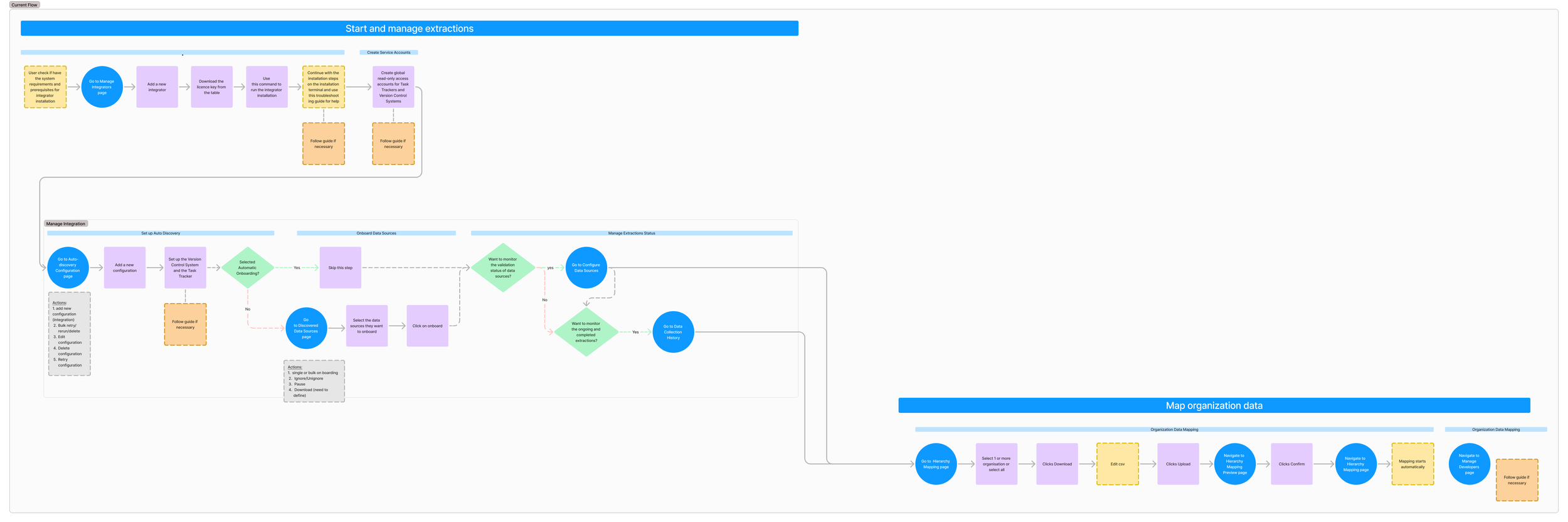
Understanding the lifecycle helped define the product architecture.
UX STRATEGY
Instead of redesigning individual integration screens, I proposed creating a centralised integration management system.
The strategy focused on three pillars.
1. Self-Serve Setup
Admins should be able to connect data sources independently through guided configuration flows.
This required simplifying technical configuration into structured steps with validation.
—
2. Integration Visibility
Admins needed a clear overview of:
which integrations were active
extraction progress
configuration issues
This would allow integrations to be managed like a system rather than a setup task.
—
3. Error Recovery
When failures occur, users should receive actionable guidance instead of generic error messages.
This reduces dependency on support teams.
THE SOLUTION
The redesigned experience introduced a Manage Integrations hub that supports the entire lifecycle of integrations.
Admins connect their Version Control System through a step-by-step onboarding flow.
Design improvements included:
• breaking complex setup into clear steps
• validating credentials before progressing
• providing contextual guidance on permissions
This made integrations easier to configure without technical assistance.
1. Guided Integration Setup
Once connected, admins can select and map repositories directly inside the platform.
The interface was designed to handle large enterprise repository structures without overwhelming users.
Key design decisions:
• searchable repository lists
• bulk selection
• clear mapping confirmation
2. Repository & Data Mapping
A key improvement was introducing integration health visibility.
Admins can quickly see:
• connection status
• extraction progress
• configuration issues
This allows them to monitor integrations as part of ongoing operations.
3. Integration Health Monitoring
CONCLUSION
This project reinforced the importance of designing product systems rather than individual features.
Integrations are not just connection points between tools — they are data pipelines that users must trust.
By improving transparency and control, we helped users feel confident that their engineering data was accurate and reliable.
The new integration system helped shift onboarding toward self-service automation.
Key outcomes included:
• administrators could onboard data sources independently
• reduced reliance on support and implementation teams
• improved visibility into data extraction health
• faster onboarding for enterprise customers
The project also established a scalable integration framework for future tools.