Code Insights - Secrets Detection SaaS Platform
A case study explaining the design process behind the creation of this SaaS platform, from research to final designs.
Designer - Morgane Lara
BlueOptima
SaaS, Web and Mobile
Involvement
UX/UI Design
Year
2024
THE ROLE
The project focused on the inadvertent introduction of secrets (e.g., passwords, API keys) into codebases, a critical security risk that can lead to unauthorized access and data breaches. Existing tools often fail to provide real-time detection, generate false positives, and disrupt developer workflows, resulting in ignored warnings and security vulnerabilities.
CONTEXT
The main goals were to design a solution that offers real-time detection of secrets, minimizes false positives, and seamlessly integrates with existing workflows. The solution aimed to enhance code security, ensure team consistency, and increase user engagement within a SaaS environment, ultimately reducing the incidence of exposed secrets and improving software security metrics.
GOALS
Understand the real issue
To deeply understand the challenges related to secret detection and code security, I conducted a survey. However, due to confidentiality reasons, I didn’t reach out to real users. Instead, I created personas and simulated a survey using AI to gather insights.

MAIN PERSONA
Emily, 29, Software Engineer
—
Goals: Ensure secure code without disrupting workflow
Challenges: Balancing speed and security, tracking team adherence to security practices
Interesting Insight: Emily values real-time secret detection that integrates smoothly into her workflow without interrupting her productivity.
-
Michael, 38, Development Team Lead
--
Goals:
Maintain high code security across the team, reduce manual reviewsChallenges:
Managing large codebases, ensuring less experienced developers avoid security lapses
Interesting Insight:
Michael requires oversight tools that flag any secrets introduced by his team, along with comprehensive security performance reports. -
Sarah, 32, DevOps Engineer
--
Goals: Automate security checks in the deployment pipeline, ensure secure infrastructure with frequent deployments, collaborate smoothly with developers.Challenges: Keeping pace with rapid development and frequent deployments, managing incidents of exposed secrets, balancing security tools with deployment efficiency.
Interesting Insight: Sarah needs a tool that integrates seamlessly with the CI/CD pipeline for automated secrets detection and provides detailed logs and customizable alerts to maintain security without hindering deployment speed.
Method:
Survey 1: Conducted with Software Engineers, Security, and DevOps Teams. Focused on their workflows, handling of secrets, pain points, and tool preferences. Link to survey
Survey 2: Conducted with Software Engineering Team Leads, Product Managers, and Leadership. Explored their oversight roles, challenges, and needs for security tools. Link to survey
SURVEYS
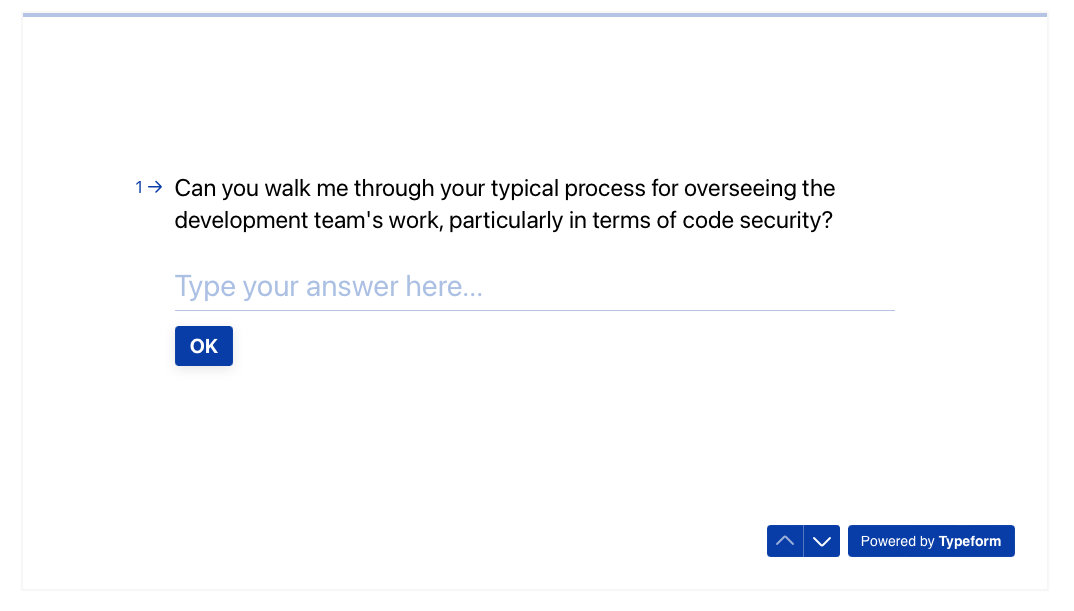
Survey on development security processes and emergencies handling
Workflow & Practices
🛠️ Engineers: Use various methods for handling secrets, often facing challenges with accidental exposures.
🧑💼 Team Leads and Managers: Focus on guiding secure practices and monitoring compliance.
Pain Points
🚨 Common Issues: Exposed secrets and ineffective current tools.
🔄 Integration Challenges: Struggle with integrating security tools without disrupting development processes.
Tool Needs
🔗 Integration: Tools need to integrate seamlessly with CI/CD pipelines.
📊 Features: Provide detailed logs and customizable alerts.
📬 Communication: Effective notifications or reports are essential.
Collaboration & Resolution
🤝 Collaboration: Effective collaboration on security issues is crucial.
📞 Communication: Clear communication channels are vital for resolving issues.
Success Metrics
🛡️ Prevention: Tools should prevent security issues.
🔄 Workflow Fit: Should integrate smoothly into existing workflows.
📈 Insights: Provide actionable insights and detailed metrics.
KEY RESULTS
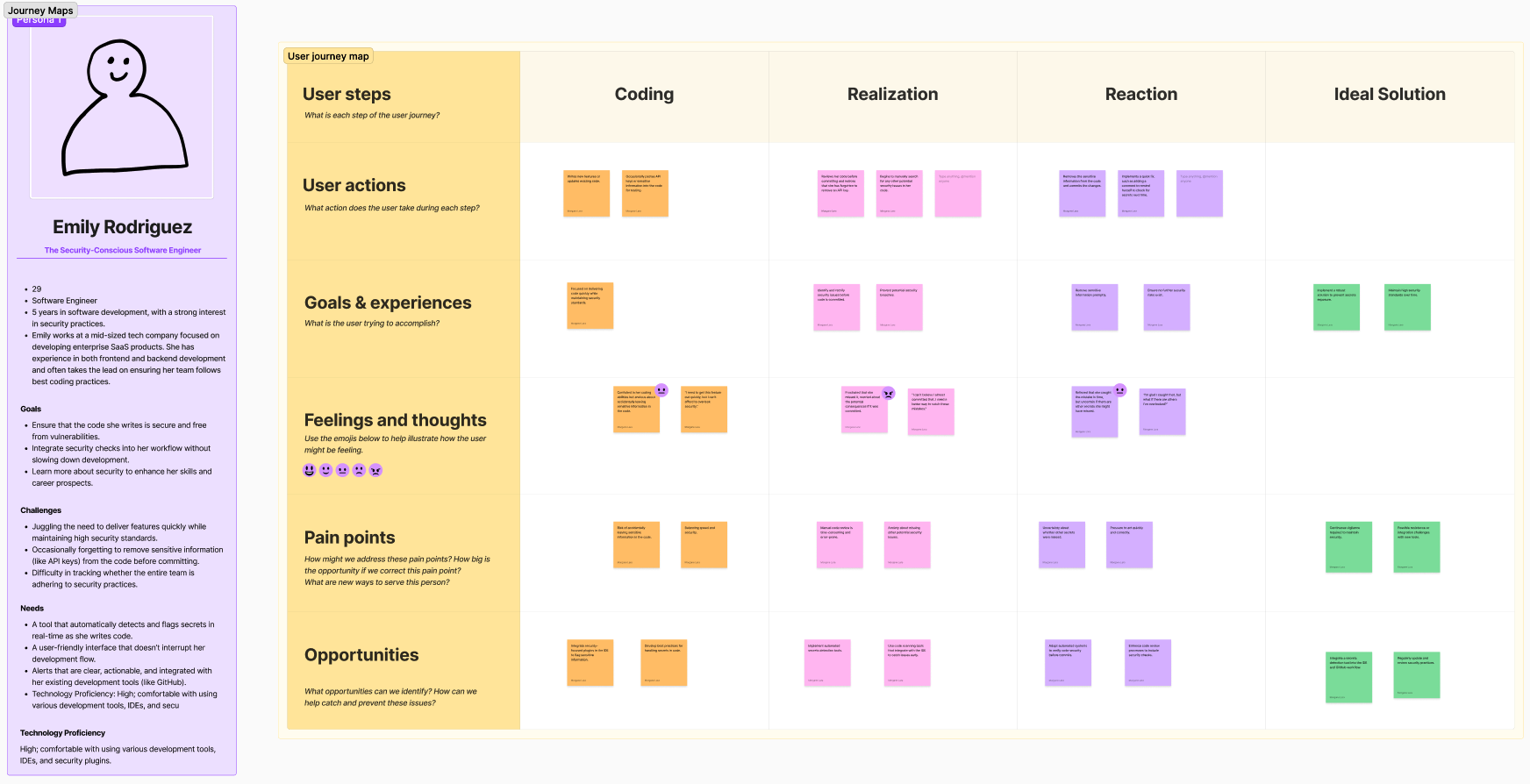
Thanks to these insights, I was able to create detailed journey maps to pinpoint where issues were occurring in the workflow and identify key opportunities for improvement.
Emily, Software Engineer
Link to full journey map
Concerns 🔒: Slow, error-prone reviews and risk of exposing sensitive data.
Opportunity: Integrate automated security tools and improve review processes.Speed vs. Security 🕵️♂️: Pressure to deliver quickly can lead to oversights.
Opportunity: Automate security checks and streamline workflows.Anxiety 😰: Fear of committing sensitive info and missing issues.
Opportunity: Enhance training and use detailed alerts.Solutions 🛠️: Reactive issue handling.
Opportunity: Implement proactive detection tools and continuous monitoring.
JOURNEY MAPPING
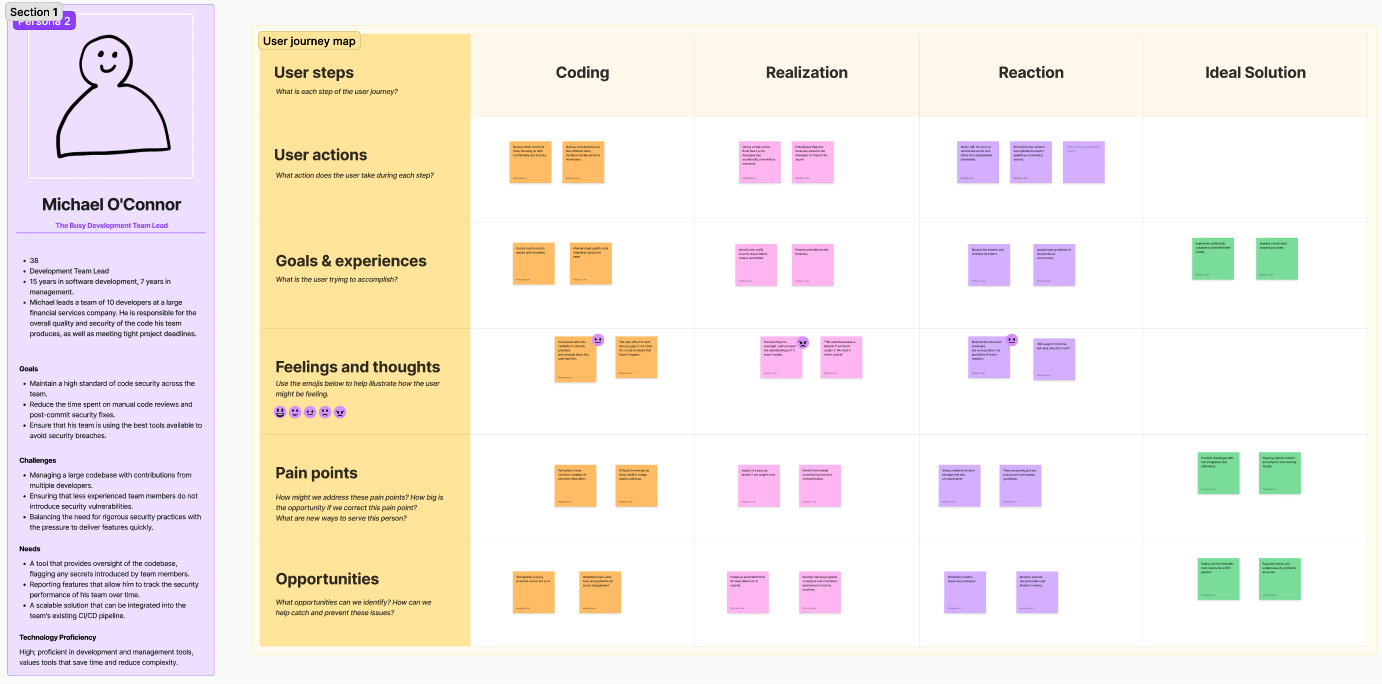
Michael, Development Team Lead
Link to full journey map
Security Practices 🔒: Inconsistent practices and secret exposure.
Opportunity: Standardize practices and automate detection tools.Incident Management 🚨: Stress and frustration with breach handling.
Opportunity: Improve incident response and communication.Documentation 📝: Time-consuming updates.
Opportunity: Enhance and streamline security documentation.Code Review 🔄: Inconsistent handling of sensitive data.
Opportunity: Standardize code reviews and update guidelines.Tools 🛠️: Need for better security tools.
Opportunity: Deploy and adapt detection tools, and update protocols regularly.
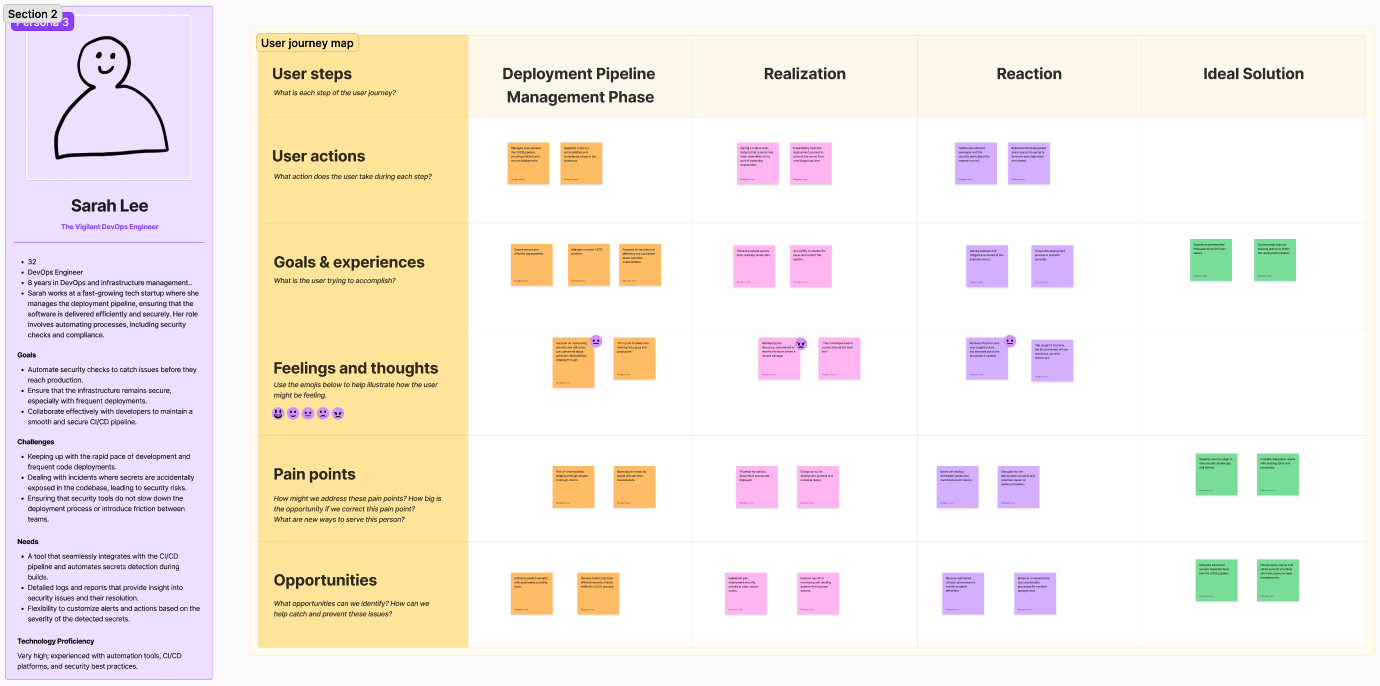
Sarah, DevOps Engineer
Link to full journey map
Pipeline Security 🛡️: Concerns about vulnerabilities.
Opportunity: Use automated scanning tools and pre-deployment checks.Efficiency ⏩: Need for faster security checks.
Opportunity: Streamline security within the CI/CD process.Pre-Deployment 🚨: Improve monitoring and rollback procedures.
Opportunity: Enhance real-time alerts and automate incident handling.Incident Handling 🔄: Better communication and coordination needed.
Opportunity: Develop automated incident response processes.Coordination 🤝: Stress in managing and resolving issues.
Opportunity: Improve team coordination and response strategies
There is a clear demand for integrated, user-friendly security tools that enhance existing workflows and provide comprehensive monitoring and alerts, without introducing friction or delays.
Key Objectives
Improve Code Security 🔒: Detects and prevents secrets from entering the codebase, protecting sensitive information.
Increase Developer Efficiency 🚀: Automates detection, allowing developers to focus on coding instead of manual secret checks.
Support Compliance 📜: Helps maintain data security compliance by preventing accidental exposure of sensitive data.
Reduce Security Risks ⚠️: Minimizes chances of secrets being exposed, reducing the risk of costly security breaches.
Provide Actionable Insights 📊: Offers insights and metrics to help teams enhance security practices and identify areas for improvement.
Time for Ideation
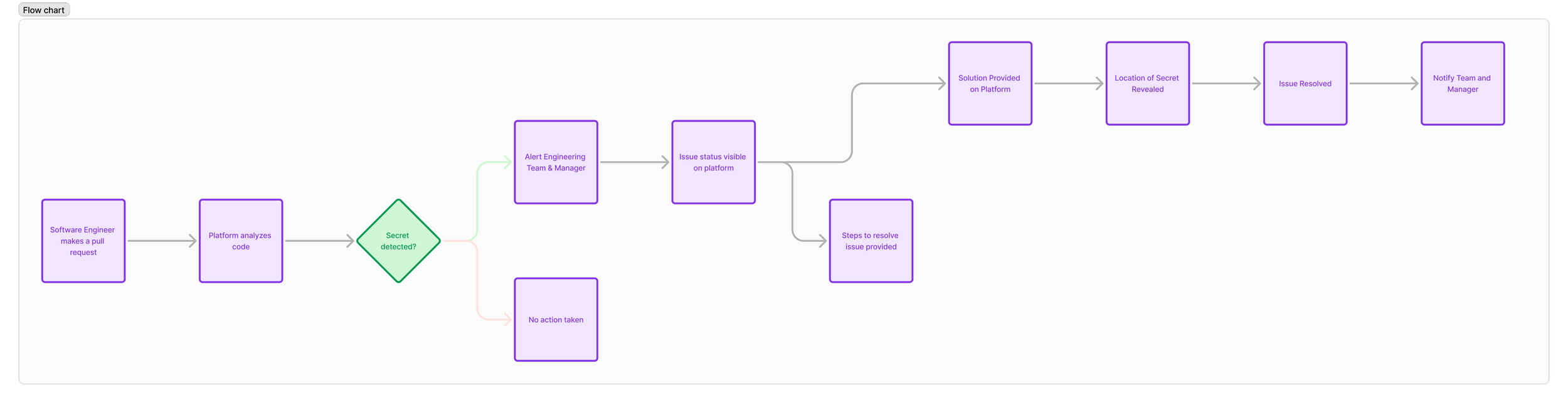
With the research completed, it was time to move into the ideation phase. Drawing from existing SaaS platforms, particularly data analytics tools, and leveraging my experience in the B2B SaaS environment.
Key Points:
Leverage Existing Platforms 🛠️: I examined popular data analytics and SaaS platforms to understand what works well. This helped in identifying effective design patterns and functionalities. Analyzing these platforms provided valuable insights into user expectations for data visualization and interaction.
User Familiarity 👥: Users prefer tools that resemble ones they already use. Salesforce CRM's layout is familiar to many B2B users. By incorporating some familiar design principles, such as tabbed navigation and customizable elements, we create a bridge between traditional and modern experiences.
Ease of Use 🎯: The goal is to design an experience that feels natural and easy to navigate, enhancing user comfort and efficiency. Asana and Trello use clean, intuitive interfaces. The goal was to maintain simplicity and focus on usability, drawing on their best practices to ensure ease of use.
Sticking with familiar design elements ensures that users can quickly adapt to the new tool, making the transition smoother and more effective.
I developed several initial concepts to address the identified pain points, including real-time secrets detection, automated security management, and adaptive reporting. After wireframing these solutions, I discovered that integrating key features from each concept could form a cohesive platform. This unified approach would effectively address the needs of multiple user personas, offering a comprehensive solution that tackles various security challenges across different stages of the development process.
These wireframes were used to map out basic layout and functionality, helping to validate core features and user flows.
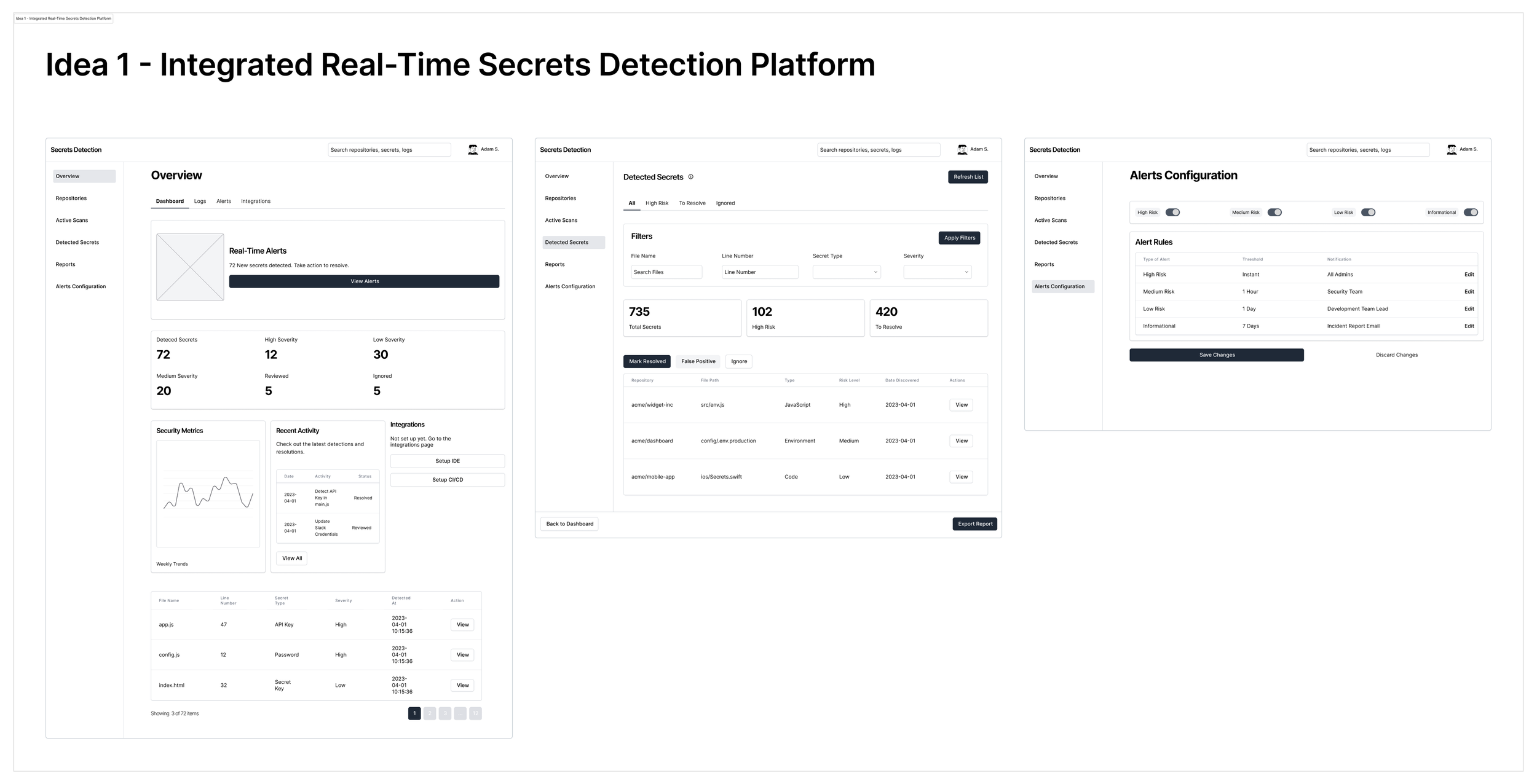
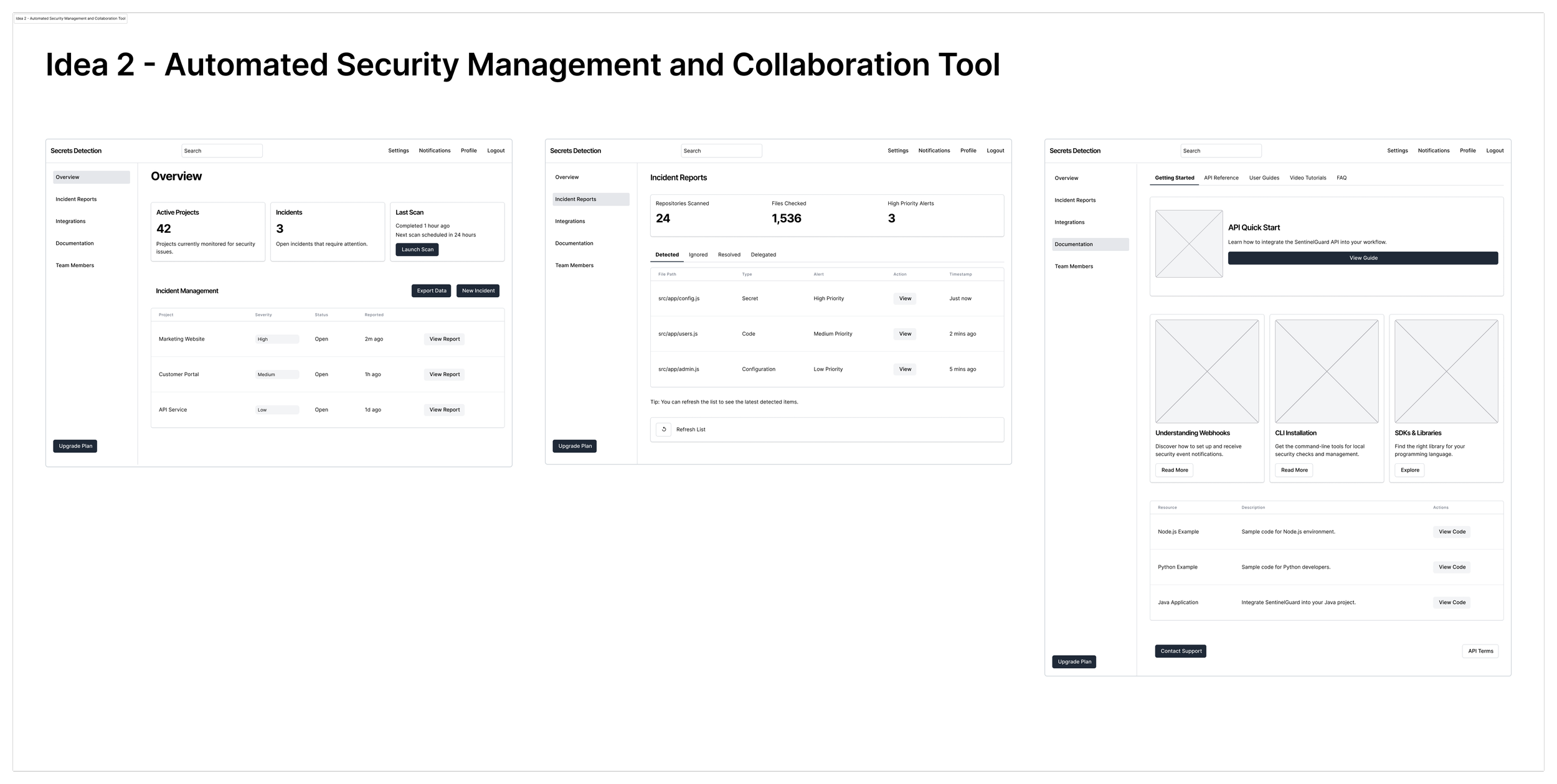
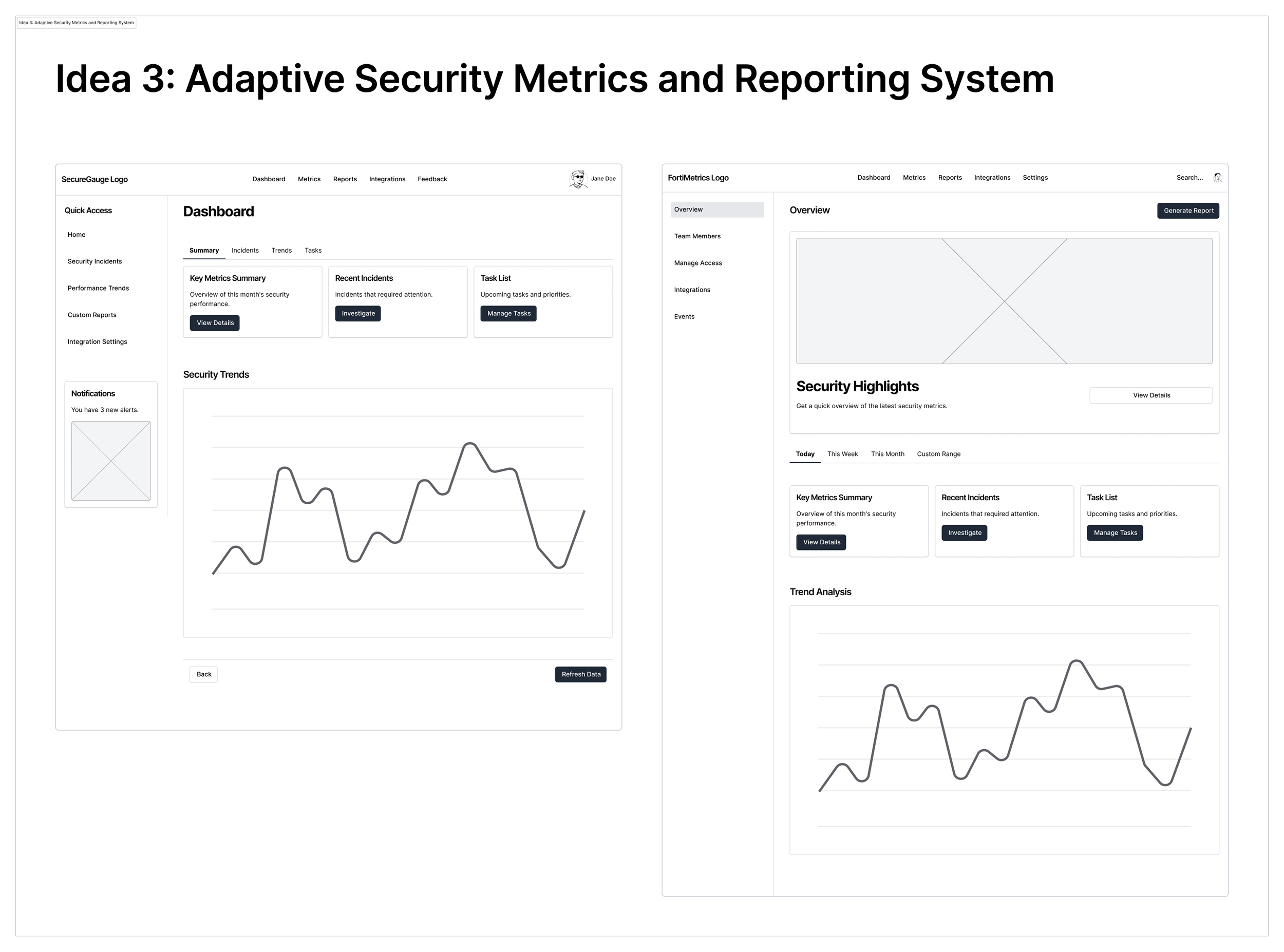
The Solution
Integrated Real-Time Secrets Detection Platform 🌐🔒
This platform merges elements from real-time secrets detection, automated security management, and adaptive reporting into a single cohesive tool. It’s designed to provide a streamlined and comprehensive solution for code security.
Key Features:
Real-Time Secrets Detection 🕵️♂️
- IDE Integration: Seamlessly integrates with IDEs like Visual Studio Code to provide instant alerts for detected secrets.
- CI/CD Pipeline Integration: Works with tools like GitHub Actions to detect and block secrets during build and deployment processes.Customizable Alerts and Reporting 📊
- Centralized Dashboard: Allows team leads to monitor security metrics and customize alert thresholds.
- Actionable Insights: Offers detailed logs and recommendations for effective issue resolution.Collaboration and Team Dynamics 🤝
- Shared Dashboards: Facilitates team collaboration with shared views of security issues and progress tracking.
- Incident Management: We could think of integrating with tools like Jira for efficient tracking and managing of security incidents.Seamless Integration and Onboarding 🚀
- Smooth Workflow Integration: Easily fits into existing tools and processes.
- Comprehensive Support: Provides onboarding materials and ongoing support to ensure smooth adoption.
Benefits:
Enhanced Security 🔒: Reduces the risk of breaches by detecting secrets in real-time.
Increased Efficiency ⚙️: Automates detection and alerts, reducing manual checks.
Improved Collaboration 🤝: Shared dashboards and integrated incident management enhance team coordination.
Adaptable and Scalable 📈: Flexible integration and support for various environments ensure it meets diverse needs.
Once the final solution and features were decided, I began with low-fidelity wireframes to outline the basic structure and functionality. As the design evolved, I progressively refined these wireframes into high-fidelity designs, incorporating detailed visuals and interactions, until reaching the final design.
Low-Fidelity Designs

Secret Detection SaaS Platform - Low Fidelity Wireframes
AI Powered Design Feedbacks
Ideally, user testing would have been an integral step in the design process. However, due to confidentiality reasons, this step was not feasible. Instead, I conducted self-testing and utilized tools like UseBerry to gain AI-powered insights into the interface's usability.
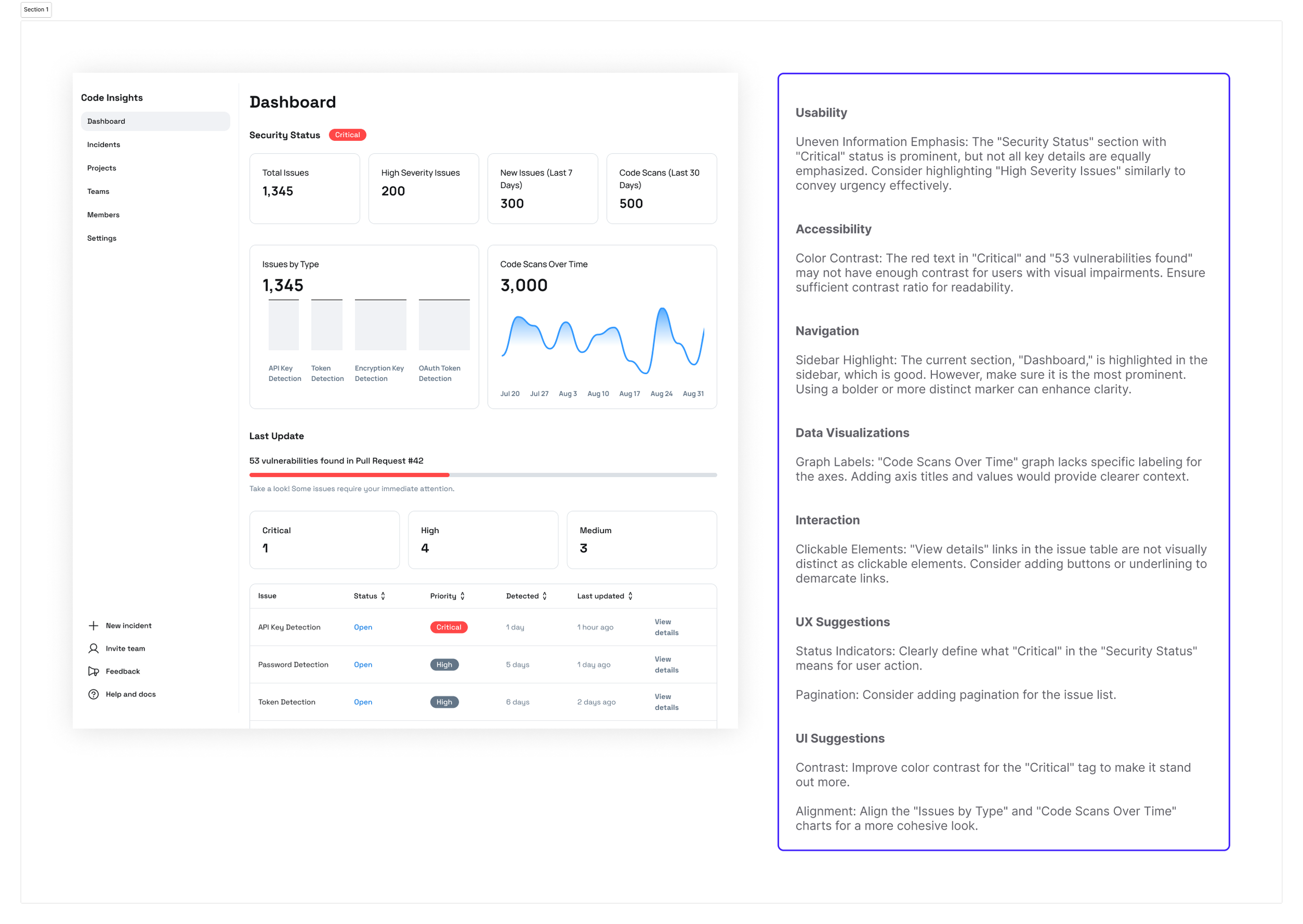
UseBerry AI Powered Design Feedback
Design Refinement
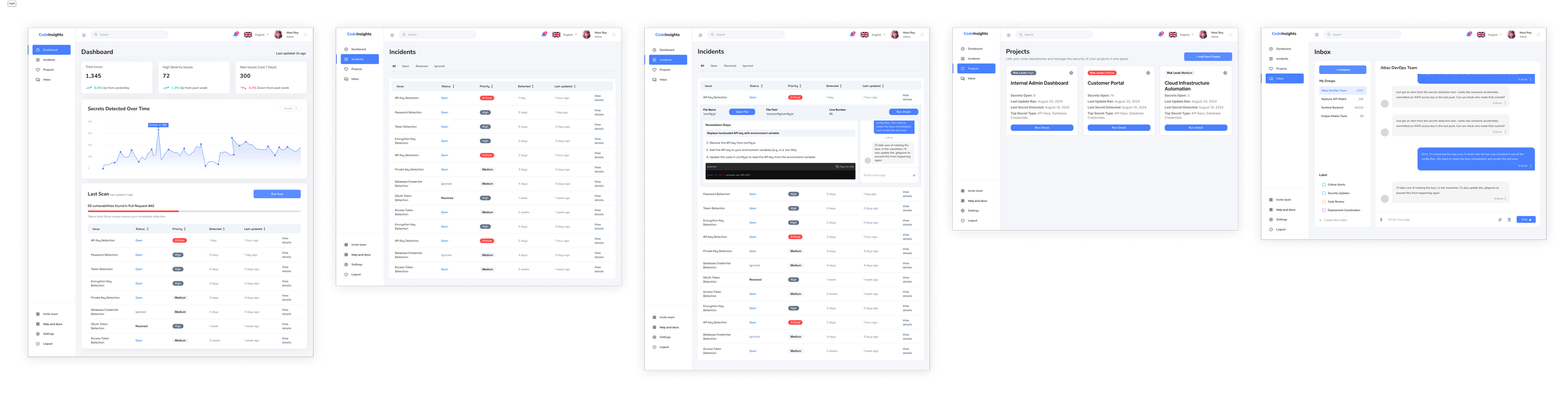
Based on the feedback and insights gathered, I refined the design to better align with user needs. I then progressed from low-fidelity wireframes to high-fidelity designs. To streamline this process and adhere to tight timelines, I utilized the DashStack design system on Figma. This allowed for rapid iterations and ensured a polished, consistent user interface throughout.
The final design solution is a sophisticated Integrated Real-Time Secrets Detection Platform that effectively integrates essential features from our initial concepts to address a range of user needs and pain points. Overall, the Integrated Real-Time Secrets Detection Platform not only addresses critical security concerns but also aligns with BlueOptima’s goals of enhancing efficiency, fostering collaboration, and ensuring robust security practices.
Enhancing Responsiveness with a Mobile App
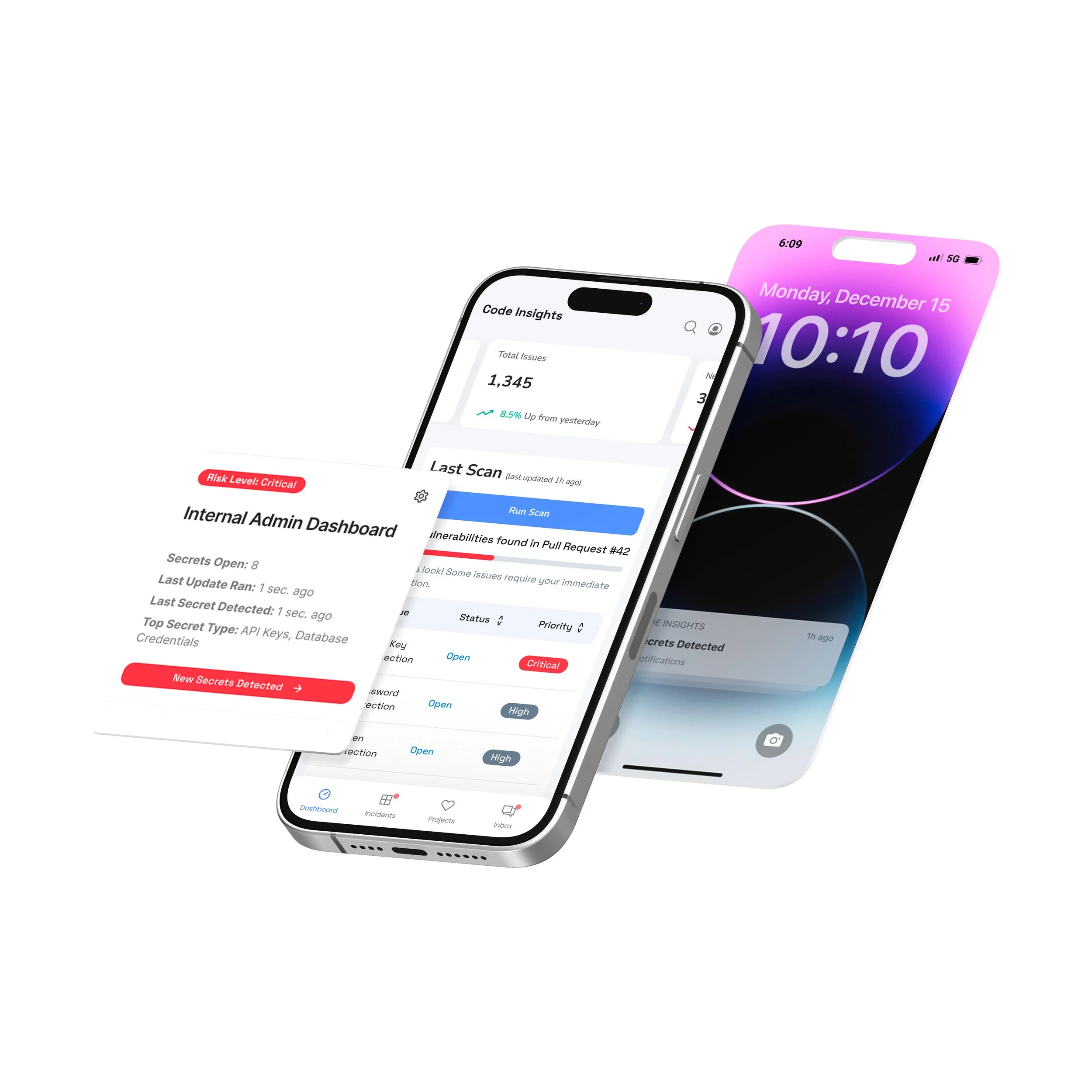
To complement the Integrated Real-Time Secrets Detection Platform and ensure seamless monitoring across all devices, I also developed a mobile app. This addition addresses the need for constant and easy access to security insights, especially for Team Leaders, allowing users to stay informed and responsive even when away from their primary workstations.
Key Features of the Mobile App:
Real-Time Notifications 🔔:
Description: Receive immediate alerts on your mobile device when secrets or vulnerabilities are detected. This ensures that security issues are addressed promptly, regardless of location.
Dashboard Access 📊:
Description: Access a streamlined version of the platform’s centralized dashboard directly from your phone. Users can view key metrics, monitor the status of ongoing incidents, and review recent alerts in real-time.
Actionable Insights 🛠️:
Description: Get actionable recommendations and detailed logs right on your mobile device. This feature helps users quickly understand the nature of detected issues and take appropriate action, even while on the go.
Incident Management 🚦:
Description: Manage and track security incidents through the mobile app. Users can update the status of ongoing issues, add comments, and collaborate with team members directly from their phone, ensuring that incident resolution continues smoothly outside of the office.
Secret Detection Tool - Mobile Demo
Final Thoughts and Next Steps
The Integrated Real-Time Secrets Detection Platform effectively addresses the identified pain points by combining key features from the initial concepts. The solution integrates real-time detection, customizable alerts, and collaborative tools, creating a comprehensive platform tailored to meet the diverse needs of different user personas. This approach not only enhances security but also improves team efficiency and collaboration.
The inclusion of a mobile app further extends the platform’s capabilities, ensuring that users have constant access to critical security information and can respond swiftly to potential threats, even when away from their desks.
Next Ideal Steps
User Testing and Feedback:
Plan 📝: Although user testing was not possible due to confidentiality, it is crucial to incorporate user feedback once the platform is in use. Collect feedback through internal testing and pilot programs to refine features and improve usability.
Action 🔄: Implement a feedback loop to gather insights from users and make iterative improvements based on their experiences.
Feature Enhancement:
Plan 🚀: Continuously enhance the platform and mobile app based on user feedback and emerging security needs. This includes adding new features, improving existing ones, and addressing any identified gaps.
Action ⚙️: Prioritize feature development based on user demand and potential impact on security and usability.
Performance Monitoring:
Plan 📊: Establish metrics and analytics to monitor the performance and adoption of both the SaaS platform and the mobile app.
Action 📈: Use tools to track key performance indicators (KPIs) and user engagement to ensure that the platform meets its goals and supports BlueOptima’s security objectives.
Metrics and Visualization
SaaS Platform Metrics:
Active Users 📈: Monitor Monthly Active Users (MAU) to track engagement levels and adoption rates.
Incident Response Times ⏱️: Measure the average time taken to resolve security incidents.
Detection Accuracy 🎯: Track the number of false positives vs. true positives in secrets detection.
Mobile App Metrics:
App Downloads and Installs 📲: Track the number of downloads and active installations.
Notification Interactions 🔔: Measure how often users interact with real-time notifications and alerts.
User Feedback 💬: Collect and analyze user ratings and feedback within the app to gauge satisfaction and identify areas for improvement.
Example Tool for Monitoring MAU:
Google Analytics: This tool can be used to track MAU and other engagement metrics for both the SaaS platform and the mobile app. Google Analytics provides detailed insights into user behavior, traffic sources, and interaction patterns, helping to visualize and understand how users engage with the platform and app.
By implementing these steps and monitoring metrics, BlueOptima can ensure that the final solution remains effective, user-friendly, and aligned with its security goals, while continuously adapting to meet the evolving needs of its users.
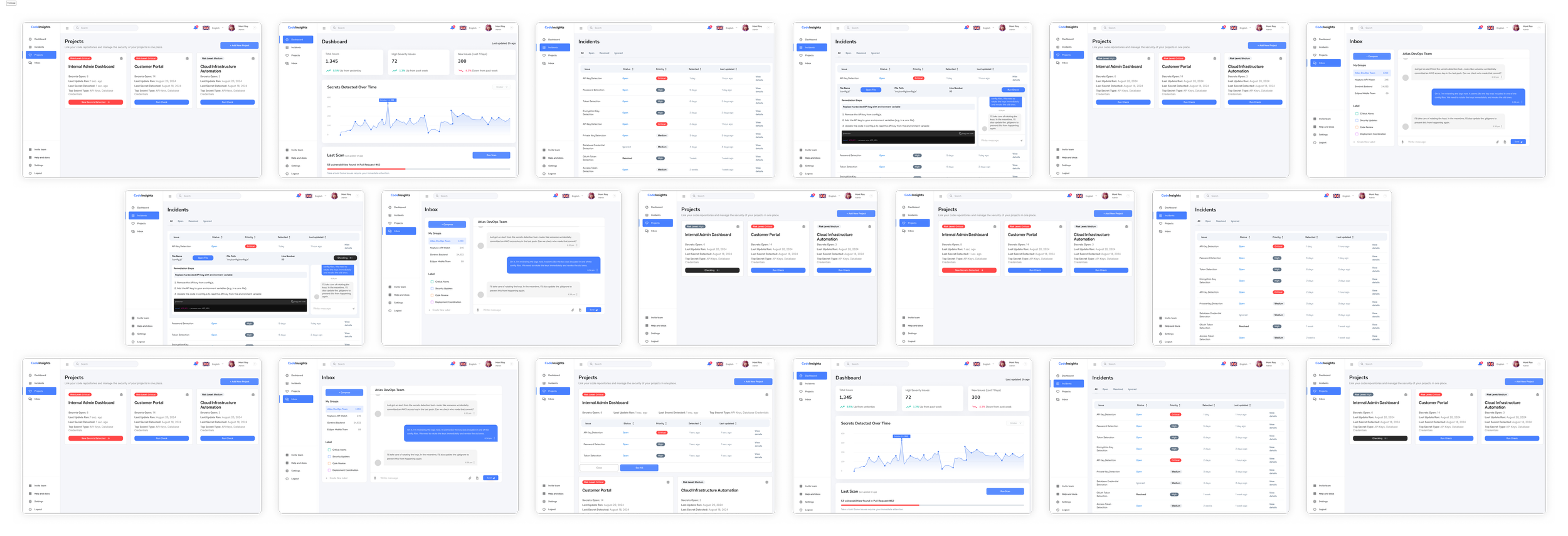
Secret Detection SaaS Platform- Final Designs
Access full prototype here